If you’re new to WordPress, learning its key terms is vital for building and managing your website effectively. Here’s a quick guide to essential WordPress terms every beginner should understand:
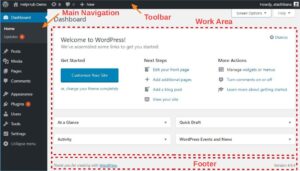
- Dashboard
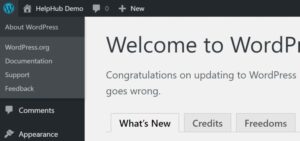
The WordPress Dashboard is the admin area where you manage your website. It’s the control center for tasks like creating posts, adding plugins, and customizing your site’s design.
- Theme
A WordPress theme determines your website’s appearance and layout. There are free and premium themes available, allowing you to customize your site’s design with ease.
- Plugins
Plugins are add-ons that enhance your site’s functionality. For example, SEO plugins improve search rankings, while e-commerce plugins add online store features.
- Post vs. Page
- Posts: Blog entries or news articles displayed in reverse chronological order.
- Pages: Static content like “About Us” or “Contact.”
- Permalinks
Permalinks are the URLs of your website’s posts and pages. Customizing permalinks improves user experience and SEO.
- Widgets
Widgets are small blocks that add functionality to your site, such as search bars, calendars, or recent posts. They’re placed in widget-ready areas like sidebars or footers.
- Menu
Menus organize your site’s navigation. They help visitors find content quickly and enhance user experience.
- Media Library
The Media Library stores all your uploaded images, videos, and files. It’s accessible via the Dashboard for easy management.
- Categories and Tags
- Categories: Broad groupings for your posts, like “Travel” or “Tech.”
- Tags: More specific labels, like “Europe” or “Gadgets.”
- Gutenberg Editor
The Gutenberg Editor, also known as the block editor, is WordPress’s default content editor. It uses blocks to create posts and pages, making design flexible and user-friendly.
Final Thoughts
Understanding these WordPress terms will help you navigate the platform with confidence. Mastering the basics is the first step toward creating a successful website.
Start building your dream site today with WordPress!